
Factory 分析器
FactoryProf 追踪你的 factories 的使用统计数据,比如,每个 factory 是怎样被经常使用的。
输出范例:
sh
[TEST PROF INFO] Factories usage

Total: 15285
Total top-level: 10286
Total time: 299.5937s
Total uniq factories: 119

 total   top-level   total time    time per call      top-level time            name
  6091        2715    115.7671s          0.0426s            50.2517s            user
  2142        2098     93.3152s          0.0444s            92.1915s            post
  ...
它展示了 factory 运行的总数和 top-level 运行的数量,比如,不在另一个 factory 运行期间(如在使用关联关系时)。
(自 v0.9.0 起)可以展示使用 factories 生成测试数据的耗费时间。 (自 v0.11.0 起)可以展示每个 factory 调用的数量。
注意:FactoryProf 仅追踪数据库持久化的 factories。对于 FactoryGirl/FactoryBot,是通过使用 create 策略所提供的 factories。对于 Fabrication,是使用 create 方法所创建的对象。
教学
FactoryProf 可跟 FactoryGirl/FactoryBot 或者 Fabrication 一起使用——应用程序可以同时安装这两个 gem 使用。
使用 FPROF 环境变量来激活 FactoryProf:
sh
# Simple profiler
FPROF=1 rspec

# or
FPROF=1 bundle exec rake test
Factory 火焰图
FactoryProf 最有用的特性就是 FactoryFlame 报告。这是对 Brendan Gregg's 的 火焰图 的特殊解读,让你可以识别出 factory cascades.
要生成 FactoryFlame 报告,把 FPROF 环境变量设置为 flamegraph:
sh
FPROF=flamegraph rspec

# or
FPROF=flamegraph bundle exec rake test
报告看起来是这样的:
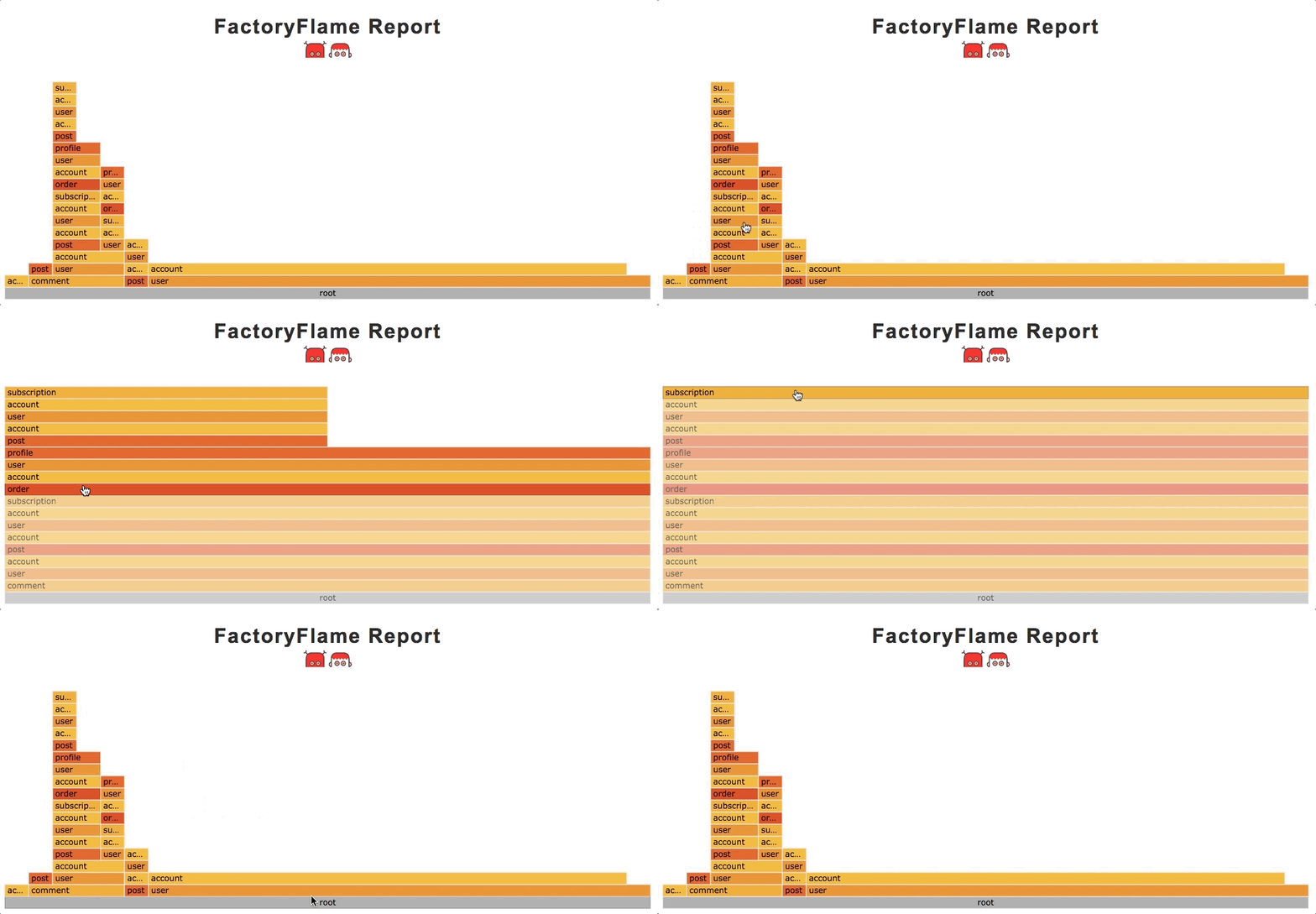
如何解读它?
每一栏指示一个 factory stack 或 cascade,其是一个递归 #create 方法调用的序列。考虑下面这个范例:
ruby
factory :comment do
  answer
  author
end

factory :answer do
  question
  author
end

factory :question do
  author
end

create(:comment) #=> creates 5 records

# And the corresponding stack is:
# [:comment, :answer, :question, :author, :author, :author]
栏越宽,其堆栈出现的频率越高。
root 单元格展示了 create 调用的总数。