
FactoryProf
FactoryProf tracks your factories usage statistics, i.e. how often each factory has been used.
Example output:
[TEST PROF INFO] Factories usage

Total: 15285
Total top-level: 10286
Total time: 04:31.222 (out of 07.16.124)
Total uniq factories: 119

   name           total   top-level   total time    time per call      top-level time

   user            6091        2715    115.7671s          0.0426s            50.2517s
   post            2142        2098     93.3152s          0.0444s            92.1915s
   ...
It shows both the total number of the factory runs and the number of top-level runs, i.e. not during another factory invocation (e.g. when using associations.)
It also shows the time spent generating records with factories and the amount of time taken per factory call.
NOTE: FactoryProf only tracks the database-persisted factories. In case of FactoryBot these are the factories provided by using create strategy. In case of Fabrication - objects that created using create method.
Instructions
FactoryProf can be used with FactoryBot or Fabrication - application can be bundled with both gems at the same time.
To activate FactoryProf use FPROF environment variable:
# Simple profiler
FPROF=1 rspec

# or
FPROF=1 bundle exec rake test
Nate Heckler mode
To encourage you to fix your factories as soon as possible, we also have a special Nate heckler mode.
Drop this into your rails_helper.rb or test_helper.rb:
require "test_prof/factory_prof/nate_heckler"And for every test run see the overall factories usage:
[TEST PROF INFO] Time spent in factories: 04:31.222 (54% of total time)Variations
You can also add variations (such as traits, overrides) information to reports by providing the FPROF_VARS=1 environment variable or enabling it in your code:
TestProf::FactoryProf.configure do |config|
  config.include_variations = true
end
For example:
$ FPROF=1 FPROF_VARS=1 bin/rails test

...

[TEST PROF INFO] Factories usage

Total: 15285
Total top-level: 10286
Total time: 04:31.222 (out of 07.16.124)
Total uniq factories: 119

   name           total   top-level   total time    time per call      top-level time

   user            6091        2715    115.7671s          0.0426s             50.251s
     -             5243        1989      84.231s          0.0412s             34.321s
     .admin         823         715      15.767s          0.0466s              5.257s
     [name,role]     25          11       7.671s          0.0666s              1.257s
   post            2142        2098      93.315s          0.0444s             92.191s
     _             2130        2086      87.685s          0.0412s             88.191s
     .draft[tags]    12          12       9.315s           0.164s             42.115s
   ...
In the example above, - indicates a factory without traits or overrides (e.g., create(:user)), .xxx indicates a trait and [a,b] indicates the overrides keys, e.g., create(:user, :admin) is an .admin variation, while create(:post, :draft, tags: ["a"])—.draft[tags]
Variations limit config
When running FactoryProf, the output may contain a variant that is too long, which will distort the output.
To avoid this and focus on the most important statistics you can specify a variations limit value. Then a special ID ([...]) will be shown instead of the variant with the number of traits/overrides exceeding the limit.
To use variations limit parameter set FPROF_VARIATIONS_LIMIT environment variable to N (where N is a limit number):
FPROF=1 FPROF_VARIATIONS_LIMIT=5 rspec

# or
FPROF=1 FPROF_VARIATIONS_LIMIT=5 bundle exec rake test
Or you can set the limit parameter through the FactoryProf configuration:
TestProf::FactoryProf.configure do |config|
  config.variations_limit = 5
end
Exporting profile results to a JSON file
FactoryProf can save profile results as a JSON file.
To use this feature, set the FPROF environment variable to json:
FPROF=json rspec

# or
FPROF=json bundle exec rake test
Example output:
[TEST PROF INFO] Profile results to JSON: tmp/test_prof/test-prof.result.jsonReducing the output
When running FactoryProf, the output may contain a lot of lines for factories that has been used a few times. To avoid this and focus on the most important statistics you can specify a threshold value. Then you will be shown the factories whose total number exceeds the threshold.
To use threshold option set FPROF_THRESHOLD environment variable to N (where N is a threshold number):
FPROF=1 FPROF_THRESHOLD=30 rspec

# or
FPROF=1 FPROF_THRESHOLD=30 bundle exec rake test
Or you can set the threshold parameter through the FactoryProf configuration:
TestProf::FactoryProf.configure do |config|
  config.threshold = 30
end
Truncate long factory-names
When running FactoryProf on a codebase with long factory names, the table layout may break. To avoid this you can allow FactoryProf to truncate these names.
To use truncation set FPROF_TRUNCATE_NAMES environment variable to 1:
FPROF=1 FPROF_TRUNCATE_NAMES=1 rspec

# or
FPROF=1 FPROF_TRUNCATE_NAMES=1 bundle exec rake test
Or you can set the truncate_names parameter through the FactoryProf configuration:
TestProf::FactoryProf.configure do |config|
  config.truncate_names = true
end
Factory Flamegraph
The most useful feature of FactoryProf is the FactoryFlame report. That's the special interpretation of Brendan Gregg's flame graphs which allows you to identify factory cascades.
To generate FactoryFlame report set FPROF environment variable to flamegraph:
FPROF=flamegraph rspec

# or
FPROF=flamegraph bundle exec rake test
That's how a report looks like:
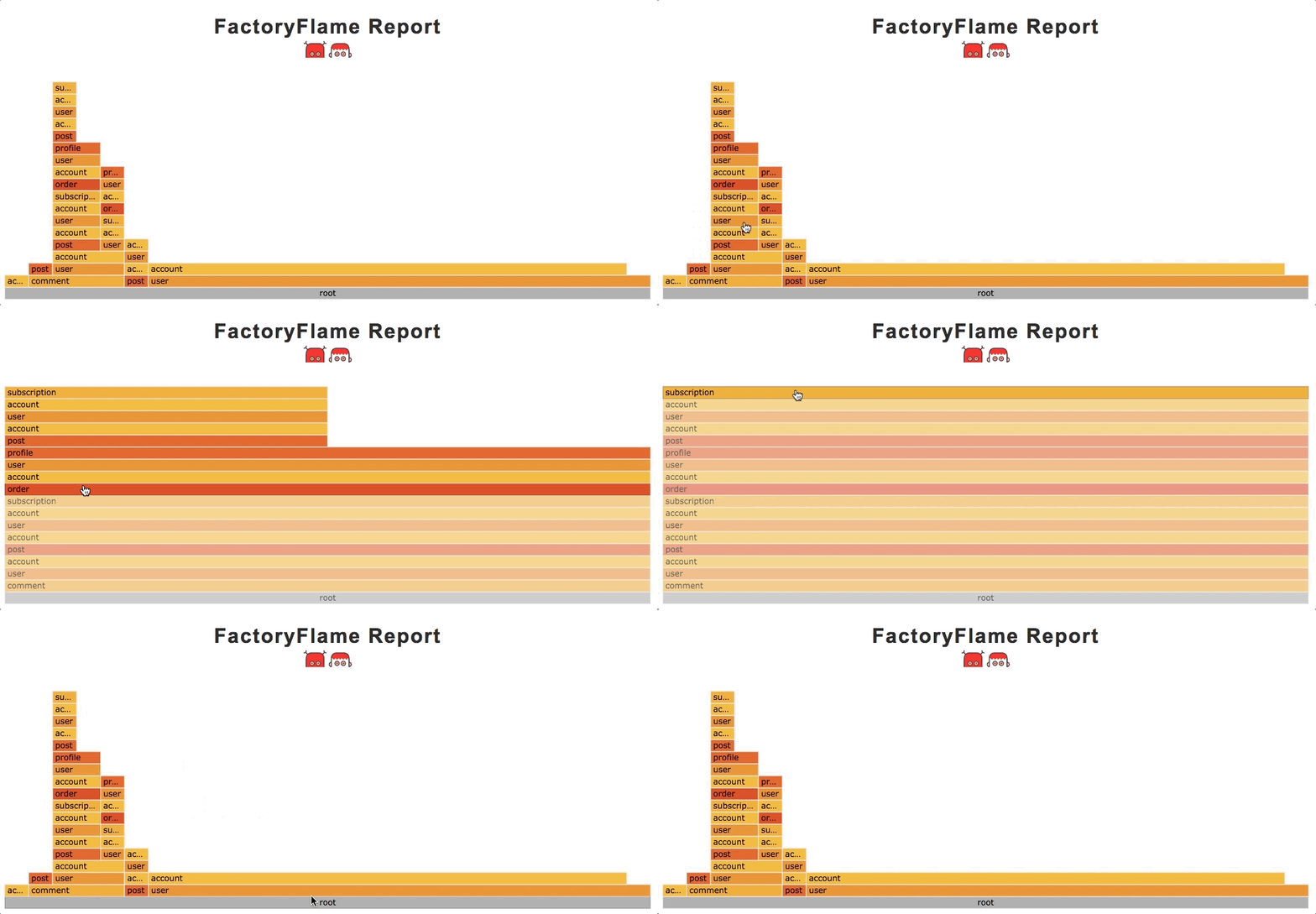
How to read this?
Every column represents a factory stack or cascade, that is a sequence of recursive #create method calls. Consider an example:
factory :comment do
  answer
  author
end

factory :answer do
  question
  author
end

factory :question do
  author
end

create(:comment) #=> creates 5 records

# And the corresponding stack is:
# [:comment, :answer, :question, :author, :author, :author]
The wider column the more often this stack appears.
The root cell shows the total number of create calls.
Acknowledgments
Thanks to Martin Spier for d3-flame-graph
Thanks to Sam Saffron for his flame graphs implementation.